
How to set up your igloohome lock with Apple Watch
The integration of the Apple Watch with Igloohome smart locks represents a significant leap in the realm of smart home security and access control. By combining the convenience and functionality of the Apple Watch with the cutting-edge technology of Igloohome, users gain a seamless and secure means of managing their smart locks.
In this article, it will show you how to set up your Apple Watch to your igloohome lock.
For this feature to be supported, user must have the following:
Minimum watch OS version: 8.4
Minimum IGH app version: 3.0.4
Minimum lock version: Version 5 onwards
Simply follow the steps below:
Step 1: Login to igloohome
Step 2: Pair your lock(s) to the igloohome account
Step 3: If an Apple Watch is already paired with your phone, the feature will be visible under the `Profile` tab, located at the bottom navigation bar
Step 5: Select `+` to begin adding your paired lock(s) to your Apple Watch.
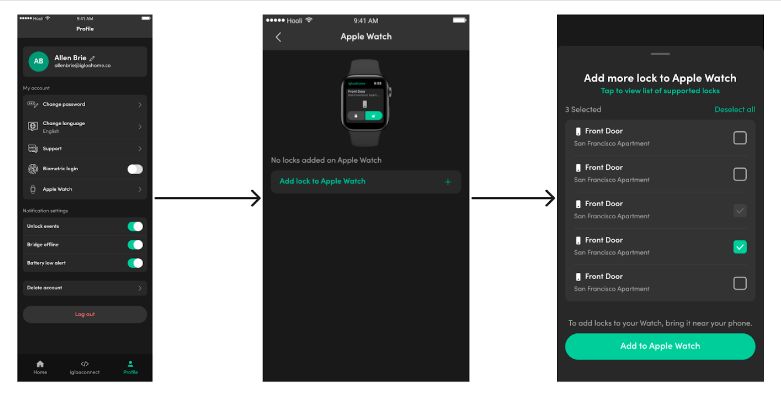
Once successfully added, you can now lock and unlock your selected lock(s) using your Apple Watch!.
Frequently Asked Questions
How to remove paired locks from Apple Watch?
1. Under the `Profile` tab, select `Apple Watch`
2. Select the bin icon located next to the locks that are currently paired
3. To confirm, select `Remove`
What is the maximum number of locks that can be paired on the Apple Watch app?
Up to 10 locks can be paired on the Apple Watch app
Do I have to be near the lock for the Apple Watch app to work?
Yes, as the unlock action uses Bluetooth function, the user is required to be within Bluetooth range to perform this action.
Do I need cellular data for the watch app to work?
The watch app only requires being within Bluetooth range to perform the action. No Wi-Fi or cellular is required to perform this function.