
Bridge Status LED
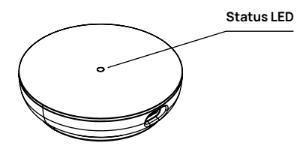
| BEHAVIOR | INDICATOR |
|---|---|
| Off | There is no power to the Bridge |
| Solid White | The Bridge is powering up |
| Glowing Orange | The Bridge is in pairing mode |
| Solid Green | The Bridge is connected to the internet and all locks are connected to the Bridge |
| Glowing Green and Orange | Some of the linked locks are not connected to the Bridge |
| Solid Orange | None of the linked locks are connected to the Bridge |
| Solid Red | The Bridge is not connected to the internet |
| Blinking Blue | The Bridge is communicating using Bluetooth |
| Blinking Green | The Bridge is communicating using WiFi |
| Cycling Red-Green-Blue | The Bridge is resetting to the factory default state |
Network Adapter Status LED
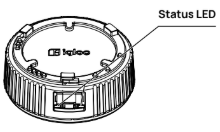
| LED POSITION | STATE | MEANING |
Left | Off | No link detected |
Left | Solid Green | Link established |
Left | Blinking Green | Data Activity |
Right | Off | No power over Ethernet |
Right | Solid Orange | Power over Ethernet detected |